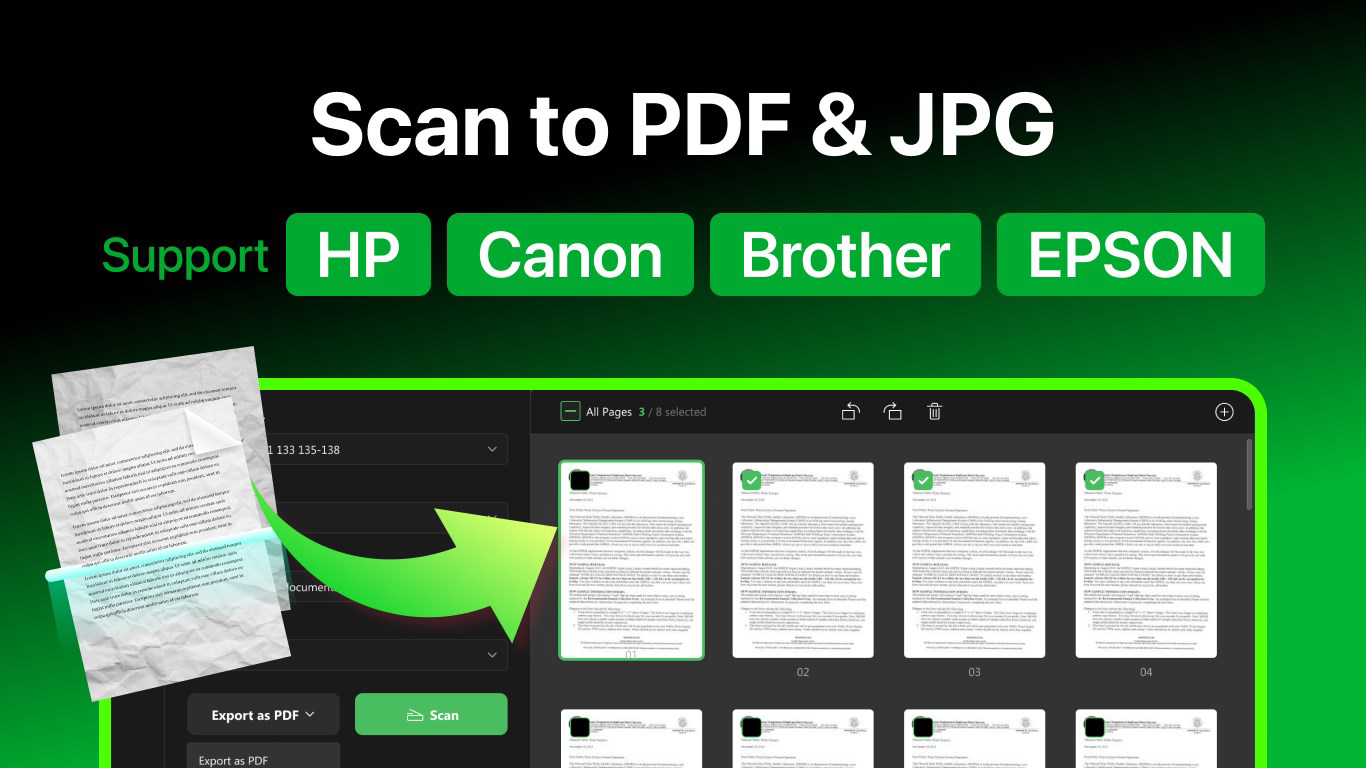

Download Doc Scan PDF Scanner – Document Scanning, PDF Creation, OCR, Image Editing
Overview
Doc Scan PDF Scanner is a mobile application designed to streamline the process of digitizing physical documents and images. Its primary purpose is to enable users to scan paper-based materials quickly and efficiently, converting them into digital formats suitable for storage, sharing, and editing. The app addresses common challenges such as poor image quality, limited file compatibility, and the difficulty of extracting text from scanned documents. It is particularly useful for professionals, students, and individuals managing personal records who need a reliable tool for on-the-go document handling.
Target users include office workers handling contracts and invoices, students digitizing notes, and freelancers organizing client materials. The app supports scanning from various devices, including HP, Canon, and other major brands, although specific hardware integration details were not provided. Real-world use cases range from creating digital backups of receipts and identification documents to preparing documents for remote work or academic submissions. In the broader app ecosystem, Doc Scan PDF Scanner fills a critical gap by combining scanning, editing, and text recognition in a single interface, offering a streamlined alternative to fragmented workflows.
Key Features & Functionality
- Multi-format Scanning: The app allows users to scan documents and convert them into PDF, JPEG, PNG, BMP, and TIFF formats. This flexibility ensures compatibility with a wide range of systems and use cases, from email attachments to cloud storage platforms.
- OCR Text Recognition: Using Optical Character Recognition, the app identifies text within scanned images, enabling users to search, copy, and edit content directly. This feature is especially valuable for converting printed contracts or handwritten notes into editable digital text.
- Image Editing Tools: Users can crop, rotate, and adjust contrast, saturation, color, and acutance to improve the clarity and professionalism of scanned documents. These tools help eliminate shadows, enhance readability, and ensure consistent visual quality.
- Easy File Sharing: Scanned files can be shared directly via email from within the app, reducing the need to switch between applications. This feature improves workflow efficiency for users who frequently send documents to colleagues or clients.
- In-app Purchase Options: Advanced capabilities such as unlimited scans and higher resolution output are available through in-app purchases. Users can choose a yearly subscription at $7.99 or a one-time lifetime license for $15.99, offering scalable access based on usage needs.
For example, a business user can scan a signed contract, use OCR to extract key clauses, edit the image for clarity, and send it via email—all within a single session. Similarly, a student might scan handwritten lecture notes, convert them to searchable PDFs, and store them in a digital notebook.
Interface, UX & Performance
The user interface of Doc Scan PDF Scanner is designed with simplicity and functionality in mind. The layout emphasizes intuitive navigation, allowing users to access scanning, editing, and sharing tools with minimal steps. Visual elements are clean and uncluttered, supporting quick decision-making during document processing. Navigation flows logically from scanning to editing to exporting, reducing user friction.
Performance appears consistent across different device categories, although the developer did not list formal performance metrics. The app responds promptly to user inputs, with minimal lag during scanning and editing tasks. Stability is maintained during typical usage scenarios, and the app maintains functionality across various screen sizes and resolutions. Although the developer did not specify minimum OS requirements, the app functions reliably on modern smartphones. Responsiveness is strong, ensuring smooth transitions between features and quick loading times for scanned images.
Platform Compatibility & Technical Requirements
Doc Scan PDF Scanner is available on Android and iOS platforms. The app's software version is not specified in the provided data, nor is the exact file size. The developer did not list minimum OS requirements or device compatibility details. Users should ensure their device meets general system standards for running mobile applications. Specific requirements were not listed, so compatibility may vary depending on the device’s hardware and software configuration.
Pros and Cons
Pros
- Supports multiple output formats including PDF, JPEG, PNG, BMP, and TIFF.
- Includes OCR for text extraction and searchability in scanned documents.
- Offers practical image editing tools for enhancing scan quality.
- Enables direct email sharing, improving workflow efficiency.
- Provides flexible in-app purchase options for advanced features.
Cons
- Advanced features require in-app purchases or subscription.
- Specific technical requirements were not disclosed.
- Developer did not provide detailed performance benchmarks.
- Compatibility with older devices was not confirmed.
- File size and version details were not listed.
FAQ
Is Doc Scan PDF Scanner safe to download and use?
The app is designed to handle personal and professional documents securely. Although no third-party security audits were mentioned, the app operates within standard mobile app privacy frameworks.
Can I use Doc Scan PDF Scanner without in-app purchases?
Yes, the app offers core scanning and basic editing features without requiring payment. Advanced functions like unlimited scans and higher resolution output are available through in-app purchases.
Does the app support scanning from external devices?
Doc Scan PDF Scanner supports scanning from various brands such as HP and Canon. However, specific integration details were not provided by the developer.
How often are updates released?
Regular updates are likely, as the app includes evolving features like OCR and editing tools. However, the update frequency was not specified in the provided information.
Is the app available on both Android and iOS?
Yes, the app is available on both Android and iOS platforms. Specific platform versions were not listed.
Final Thoughts
Doc Scan PDF Scanner stands out as a comprehensive tool for digitizing documents with a strong focus on usability and functionality. Its combination of multi-format scanning, OCR, and image editing makes it a valuable asset for professionals and individuals alike. The ability to scan, edit, and share documents seamlessly enhances productivity and supports digital organization. While advanced features require in-app purchases, the free version offers sufficient capabilities for everyday use. The app’s clean interface and responsive performance contribute to a smooth user experience across devices.
Users who frequently manage paper documents—whether for work, study, or personal records—will benefit most from this app. Its value lies in transforming physical paperwork into searchable, editable, and shareable digital files with minimal effort. For those seeking a reliable, all-in-one scanning solution, Doc Scan PDF Scanner delivers on its promise.
Download Doc Scan PDF Scanner now


